Use the work you already have
Upload scanned handwritten work or digital documents, along with a PDF mark scheme. Add a combined scan or individual submissions.
Scanned PDFs · Word · Text PDFs & moreAI marking for teachers · Your mark scheme
Use AI to mark student work from handwritten scans or digital submissions, with suggested marks and individual feedback using your mark scheme. Check, adjust and give students feedback they can act on.
No subscription. Pay as you go.
Early access · Invite code required to sign up
From a pile of work to feedback ready to give
Keep the judgement. Let TicknClick take on the first pass and the paperwork.
Upload scanned handwritten work or digital documents, along with a PDF mark scheme. Add a combined scan or individual submissions.
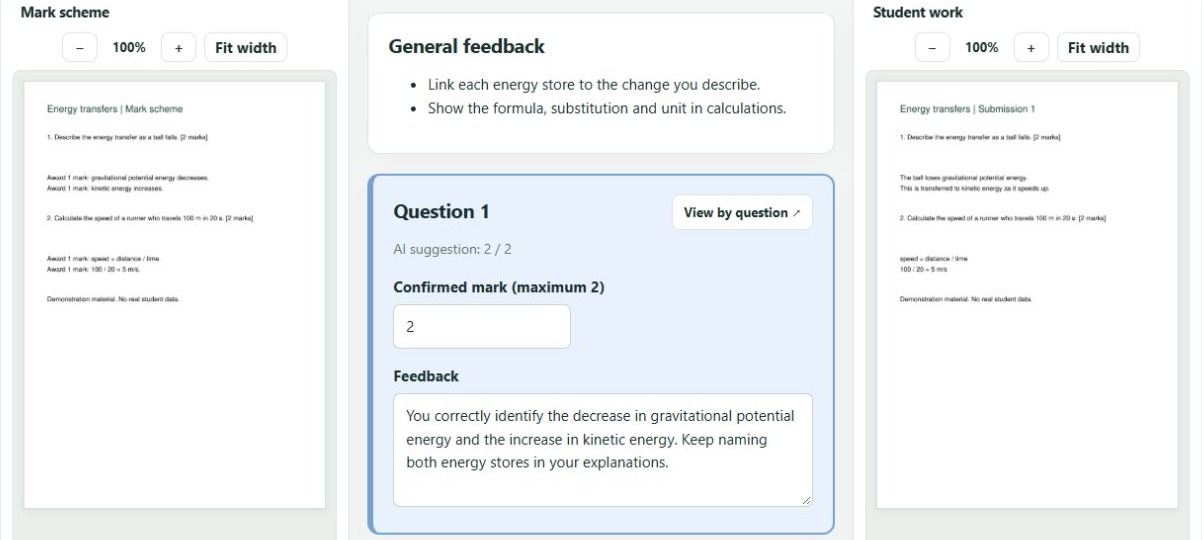
Scanned PDFs · Word · Text PDFs & moreReview suggested marks and feedback alongside the work and scheme. Edit what needs changing. Uncertainty flags highlight answers to look at more closely.
You confirm every submissionFinalise the set, then download individual Word feedback documents and a spreadsheet of marks and percentages, in submission order.
Ready to share, print or keepBuilt around your judgement
See what was written, what the scheme asks for, and what the AI suggests—together in one workspace.
AI can make mistakes, including without flagging them. Review all suggestions before finalising.
The feedback is already written
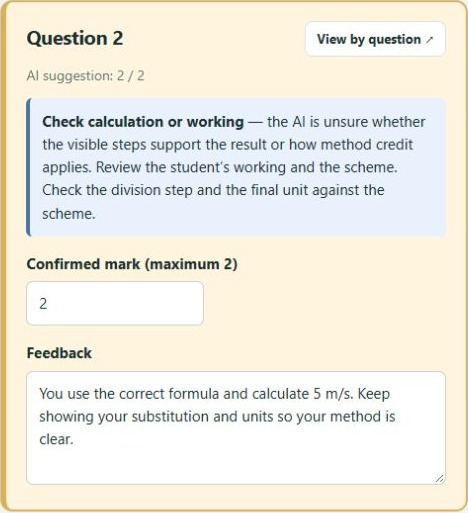
Individual feedback documents containing the reviewed marks and comments. Edit, print or share them using your usual school workflow.
Marks and percentages in a spreadsheet, ordered to match the submissions. Keep your paper stack and results together without re-entering scores.
Mark when you need to
Buy a credit pack, then use your balance for each marking set. No monthly fee. No recurring payment.
The credit cost depends on the number of submissions, marked pages and whether the work includes essays. You see the credit quote before submitting.
Credit packs start at £5.00 for 10 credits.
Create your accountInvite code required
A class-sized example
£4.00 worth of credits
8 credits for a non-essay marking set.
Calculated at the £5.00 / 10-credit pack rate. Minimum top-up: £5.00. This is credit usage, not a separate £4.00 purchase. Different page counts and essay marking can cost more.
Before your first set
Know what to upload, what to check and what you get back.
Yes. Upload handwritten or scanned work as PDFs. Use a combined PDF of equal-length papers or individual PDFs of different lengths. Unclear writing may be flagged, but you should check every response against the original.
Digital text marking accepts DOCX, TXT, ODT, RTF, Markdown and text-based PDFs as individual documents. For work containing images or embedded equations, use the handwritten/scanned PDF route. Upload your mark scheme as a PDF.
Yes. TicknClick creates a first draft, not a final judgement. Change marks and feedback, compare the work with the scheme, and confirm every submission before finalising. Uncertainty flags are helpful prompts, not a guarantee that other answers are correct.
Choose “Includes essays” when uploading. Essay questions receive a question-level mark, detailed feedback and comments on each paragraph. Structured questions in the same set still receive question-by-question feedback.
No. Buy credits in packs and use them as you mark. The upload page shows the required credits before you submit. There is no monthly fee or automatic recurring payment.
The submission content and mark scheme are sent to the configured AI provider for marking. Remove names and other identifying details before uploading, and follow your school’s requirements. For scanned work, the cover-page exclusion option removes selected cover pages before AI marking; it does not remove names elsewhere in the work.
TicknClick is currently in early access. Use your invite code to create an account, then prepare a set of student work and a mark scheme. Credit packs are available in your account.
Practical marking guides
Find the right workflow for your student work, from scanned handwritten assessments to essay feedback. Learn what to prepare and what to check before handing work back.
Your next marking set, made simpler
Handwritten or digital. Question by question. No subscription.
Early access · Invite code required