Department
Up to 15 teachers
£490 / year
2,000 shared annual credits
Up to 8,000 short submissions
Around 250 complete sets of 30 short submissions.
- All Pro features
- Department-level oversight
- Shared annual marking allowance
TicknClick for departments and schools
Bring teacher-reviewed AI marking and Pro class tools together with a shared annual credit allowance. Choose a plan for your department or school.
Contact admin@ticknclick.co.uk for a demo. School workspaces are set up by confirmed school administrators. Demo access is arranged individually.
Annual plans · one shared allowance
Every plan includes access to the Pro tools. Teacher limits count active staff logins, including school administrators and heads of department. Credits are shared across the school, rather than tied to an individual teacher.
Department
£490 / year
2,000 shared annual credits
Up to 8,000 short submissions
Around 250 complete sets of 30 short submissions.
School
£1,490 / year
6,000 shared annual credits
Up to 24,000 short submissions
Around 750 complete sets of 30 short submissions.
Large school
£2,990 / year
12,000 shared annual credits
Up to 48,000 short submissions
Around 1,500 complete sets of 30 short submissions.
These equivalents use the minimum rate of 0.25 credits per submission: up to 5 marked pages in “No essays” mode. Longer papers and essay marking use more credits. Each marking set is rounded up to a whole credit, so several small sets may use more than one larger set. A 30-submission short set costs 8 credits after rounding: the annual allowances therefore fund 250, 750 or 1,500 complete sets of 30 respectively.
These are usage equivalents, not guarantees for every assessment. The upload screen shows the credit quote before you submit.
For trusts or more than 100 teachers, contact admin@ticknclick.co.uk for a quotation. Individual teacher accounts remain pay-as-you-go.
Pro tools · available today
Import your class list from a spreadsheet, match finalised marking sets to students, and build a class record with marks, percentages and assessment results.
Compare the submission and mark scheme, adjust marks and feedback, and use review flags to focus your checks. Teachers confirm the marking before it is finalised.
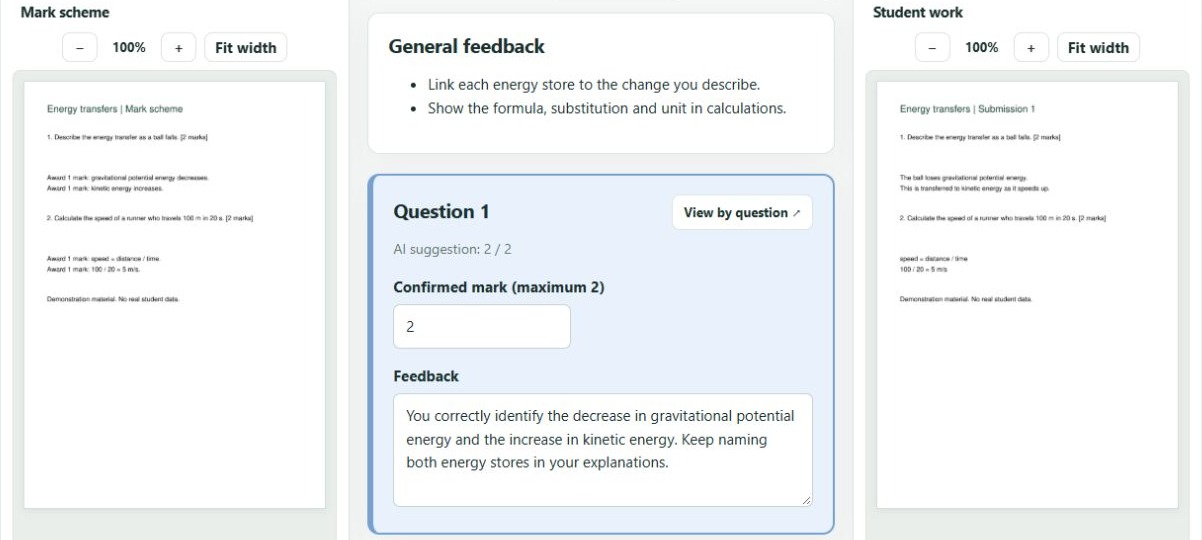
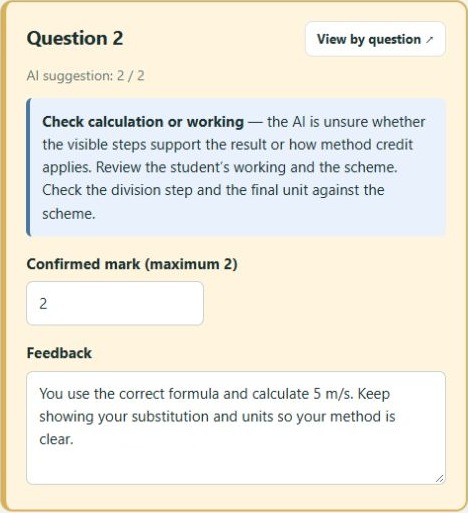
Pro class tools bring assessment results together so teachers can follow progress. Whole-set insights include an AI overview of submission feedback once marking finishes.
Export marks and individual feedback documents, or use Pro email delivery to send feedback after review and confirmation.
School workspace
Each school has its own staff, classes and shared credit balance. Heads of department see only their department. Teacher accounts stay attached to their school; there is no change-school option.
| Role | Classes and results | Administration and billing |
|---|---|---|
| Teacher | Their own classes, assessments and marking sets. | Use the shared school credit allowance for marking. |
| Head of department | Shared classes and results within their department only. | No school-wide teacher-account, subscription or billing controls. |
| School administrator | Classes and results across the school. | Manage teacher accounts, the shared balance and subscription details. |
Each subscription includes its annual credit allowance upfront after payment is confirmed. Included credits last for the paid year; separately purchased top-ups remain available while subscribed. Extra credits require an administrator purchase, with no automatic overage charges.
Try the Pro workflow
Contact admin@ticknclick.co.uk to confirm your school administrator account before setup.
Email admin@ticknclick.co.uk with your school name, approximate teacher count and the features you would like to explore. We’ll arrange demo access and discuss the right plan.
Demo access is arranged by an administrator. Sending an enquiry does not start a paid subscription.